
Ever finish a long workday and realize you’ve forgotten something important? Fireflies.ai for Entrepreneurs helps solve that problem by capturing conversations, organizing meeting notes, and turning important details into actions you can follow.
Maybe a customer requested a change, a vendor promised a better price, or someone shared a great business idea. You were paying attention at the time, but now the details are fuzzy.
And let’s face it, nobody wants to spend another hour sorting through notes after working all day.
That’s where Fireflies.ai comes in. Instead of trying to remember every conversation, you can use AI to help keep track of what matters.
Whether you’re a freelancer, blogger, consultant, or small business owner, this tool can help you stay organized. You don’t need a big team or a fancy office to benefit.
In this guide, we’ll explore 15 practical ways to use Fireflies.ai to improve client relationships, manage projects, create content, and grow your business.
You’ll also learn where to start, which features are worth trying first, and how to avoid making your workflow more complicated than it needs to be.
What Is Fireflies.ai for Entrepreneurs?
Fireflies.ai is an AI-powered meeting assistant that records, transcribes, summarizes, and analyzes conversations. Think of it as a digital assistant that handles the note-taking while you focus on what people are actually saying.
It works with popular meeting platforms like Zoom, Google Meet, and Microsoft Teams. Additionally, you can upload supported audio recordings, so you’re not limited to live video calls.
Once a meeting ends, you can review what happened without listening to the entire conversation again. Need to remember a deadline or find out who promised what? The transcript and AI summary can help you track it down.
Here’s a closer look at its main features:
- AI transcription: Turns spoken conversations into searchable text.
- Meeting summaries: Pulls out key discussion points without making you read every word.
- Action items: Identifies tasks, commitments, and next steps.
- AskFred: Lets you ask questions about recorded conversations.
- Conversation analytics: Tracks details like speaker talk time.
- Integrations: Connects meeting information with supported business apps.
Now, imagine you run a small marketing agency. On Monday alone, you meet with three clients. One wants a website update, another needs an advertising campaign, and the third wants to discuss pricing.
By the end of the day, you’ve collected enough information to fill a notebook. And that’s before you’ve even started working on those projects.
Instead of digging through handwritten notes or trying to remember every detail, you can pull up the conversations in Fireflies. Search for a specific topic, check the summary, or find the action items you need to address.
Of course, AI isn’t perfect. It can misunderstand names, numbers, or technical terms, so you’ll still want to double-check important details before acting on them.
The real advantage isn’t recording every conversation. It’s being able to find the information you need when you need it.
Want to explore more tools that can help you work smarter? Check out our guide to the 10 Best AI Platforms for Entrepreneurs to discover other ways AI can support your business.
- What Is Fireflies.ai for Entrepreneurs?
- Simplify Daily Business Operations With AI
- Improve Sales and Client Relationships
- Discover What Customers Really Want
- Create Better Content and Protect Business Agreements
- Build Stronger Teams Without Endless Meetings
- Use Fireflies.ai for Entrepreneurs to Make Smarter Growth Decisions
- How to Get Started With Fireflies.ai
- Final Thoughts: Make Every Conversation Count
Simplify Daily Business Operations With AI
Some of the most frustrating parts of running a business aren’t the big projects. They’re the small administrative tasks that keep piling up, eating into time you could spend doing something more productive.
You finish a meeting, then spend another 20 minutes updating records, sending reminders, and organizing assignments. Before you know it, half your afternoon is gone, and you haven’t touched the work you actually planned to finish.
Fortunately, you don’t have to handle every little detail manually. These first four strategies show you how Fireflies.ai can cut down on busywork and help you stay organized without adding more to your plate.
1. Turn Meeting Conversations Into Action Items
Have you ever agreed to do something during a conversation and completely forgotten about it? Maybe you promised a customer an estimate by Friday, while they agreed to send measurements or photos.
Everyone leaves the meeting feeling productive, confident that things are moving forward. Then Friday rolls around, and nobody remembers who was supposed to do what. Sound familiar?
Fortunately, Fireflies.ai can identify action items from recorded conversations and organize them into a list you can review. That means less time trying to remember what was said and more time following through on your commitments.
Here’s how to use it:
- Record your meeting after getting the required consent.
- Open the meeting summary afterward.
- Review the action items Fireflies identified.
- Confirm who’s responsible for each task and when it’s due.
- Add those commitments to your normal schedule.
For example, imagine a freelance designer discussing a website project with a client. The client agrees to send brand photos, while the designer promises three homepage concepts by the following week.
Instead of leaving everything to memory, the designer can review the action items and send a quick follow-up confirming the details. Now both people know exactly what’s expected, and there’s less room for confusion.
Of course, having an organized task list doesn’t mean the work gets done automatically. You still have to follow through, so make it a habit to review your commitments before ending your workday.
2. Automatically Save Meeting Notes to Customer Records
When you’re running a business, remembering every customer’s needs, requests, and deadlines can get overwhelming. Some businesses use software called a Customer Relationship Management system (CRM) to keep everything organized.
Think of a CRM as a digital customer notebook. Programs like HubSpot store customer names, contact information, past conversations, and upcoming tasks in one place.
So where does Fireflies.ai fit in?
Fireflies records and summarizes your customer meetings. If you connect it to a supported CRM, it can automatically send meeting notes to the customer’s record, saving you from typing everything yourself.
Here’s how that works in real life:
- A customer joins a scheduled video call with you.
- Fireflies records the conversation with permission.
- Afterward, Fireflies creates a summary of what you discussed.
- Your connected CRM receives the supported meeting notes, keeping that customer’s information together.
For example, if a customer requests a website change, you can find that discussion alongside their other project details.
Don’t use a CRM? No problem. You can still use Fireflies to organize meeting notes without connecting another program.
3. Turn Team Discussions Into Project Tasks
Ever leave a meeting with a bunch of great ideas, only to realize a week later that nobody acted on them? Someone suggested updating the website, another wanted to try a new email campaign, and everyone agreed it sounded good. Then life got busy, and those plans went nowhere.
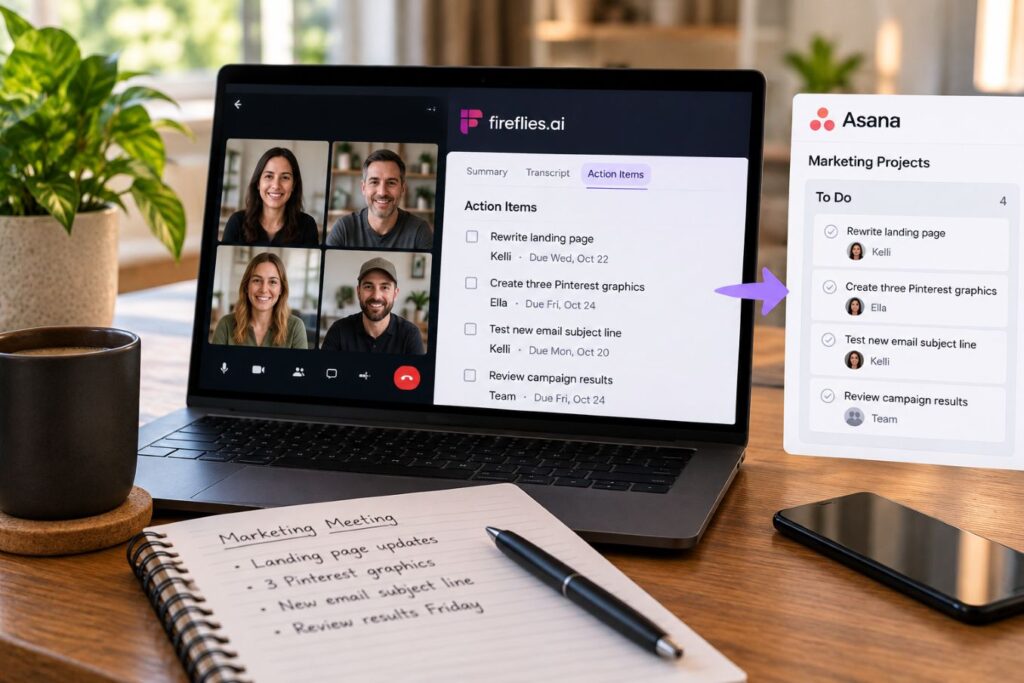
Fireflies.ai can help keep those ideas from getting lost. After recording a meeting, it identifies action items and helps you organize what needs to happen next.
Additionally, you can connect Fireflies to supported project management tools, such as Asana or Trello. These programs work like digital task boards, helping teams see what needs doing, who’s responsible, and when work is due.
Here’s an example. Imagine your marketing team agrees to:
- Rewrite a sales page by Wednesday.
- Create three Pinterest graphics.
- Test a new newsletter subject line.
- Review the campaign results on Friday.
Instead of leaving those plans buried in meeting notes, you can review the tasks and move them into your team’s project board. Depending on your integration, some steps may happen automatically.
Don’t have a team? You can use the same approach for your own business. Review your meeting action items, assign yourself deadlines, and put them on your to-do list.
Because a good idea doesn’t accomplish much until somebody actually does the work.
4. Find Past Decisions With AskFred
Ever remember agreeing to something with a customer but can’t recall the exact details? Maybe you discussed a price change three months ago, and now you’re trying to figure out what amount you settled on.
Instead of digging through old notes or replaying hours of meetings, you can use AskFred, Fireflies.ai’s built-in AI assistant. Think of it as a search tool that lets you ask questions about conversations you’ve recorded.
For example, you could ask:
- “What price did we agree on?”
- “When did the customer need the project finished?”
- “What concerns did they mention?”
- “Which tasks did I promise to complete?”
AskFred searches the meeting information it can access and helps you find relevant answers. Depending on your plan, you may also be able to search across multiple conversations, which is useful for long-term projects.
Here’s the catch: AI can misunderstand details or miss important context. So, when you’re dealing with money, deadlines, or agreements, always check the original transcript before making a decision.
That way, you’re spending less time hunting for information and more time moving your business forward.
Improve Sales and Client Relationships
Getting customers takes work, but keeping them coming back requires more than delivering a good product or service. People want to know you’re listening, that you understand their needs, and that you’ll follow through on your promises.
Unfortunately, one missed detail or confusing proposal can create frustration and damage the trust you’ve worked hard to build. That’s why keeping track of customer conversations matters.
These next two strategies show how Fireflies.ai can help you communicate more clearly, prepare better proposals, and build stronger relationships with the people who support your business.

5. Create Better Client Follow-Ups and Proposals
Imagine you’re a business consultant meeting with a potential customer. During the call, they explain their biggest problems, what they’ve already tried, and how much they’re willing to spend. That’s valuable information, especially when it’s time to put together a proposal.
Unfortunately, it’s easy to forget a few details or send a generic response that doesn’t address what the customer actually needs. Fireflies.ai helps by capturing those conversations so you can review the important points afterward.
You can also use AskFred, Fireflies’ built-in AI assistant, to help draft personalized follow-up emails based on what you discussed.
Here’s a prompt you can try:
“Create a friendly, professional follow-up email summarizing the customer’s three main concerns, the solutions we discussed, and our agreed next steps. Don’t include anything that wasn’t mentioned in the meeting.”
Once AskFred creates the draft, check it for accuracy and adjust the wording to sound like you. After all, your customers want to hear from a real person, not a robot wearing a business suit.
For a stronger proposal, review the customer’s original concerns and explain how your services address them. Additionally, include any confirmed prices, deadlines, and responsibilities so everyone knows what to expect.
A good follow-up doesn’t just remind people what you discussed. It shows them you listened and that you’re serious about earning their business.
6. Organize Investor Pitches and Funding Discussions
Not every entrepreneur needs investors, but if you’re trying to raise money to grow your business, those conversations can get complicated fast. One investor questions your pricing, another wants financial reports, and someone else asks how you plan to compete with bigger companies.
Now imagine having several of those meetings in one week. Remembering every question, concern, and promise becomes a challenge, especially when you’re already juggling the daily demands of running a business.
Fortunately, Fireflies.ai can help you record permitted investor meetings and organize the information afterward. Instead of relying on memory, you can review what each investor discussed and prepare stronger answers for your next conversation.
Here’s what you can track:
- Questions about revenue and profits.
- Concerns about business expenses.
- Requests for financial documents.
- Feedback about your business plan.
- Promised follow-ups and deadlines.
For example, if three investors question your customer acquisition costs (what you spend to gain each new customer), that’s a sign you may need to explain your numbers more clearly.
You can also use AskFred to summarize recurring concerns across supported meeting records. However, always double-check important figures and financial details against the original conversations.
One important precaution: Investor discussions may contain confidential information. Get permission before recording, and review your privacy and sharing settings carefully.
The real benefit? You’ll spend less time trying to remember what investors said and more time preparing a business case worth backing.

Discover What Customers Really Want
Your customers can tell you a lot about what your business is doing right and where it needs work. However, they don’t always come right out and say what they want. Sometimes the most valuable feedback comes from a casual comment, a repeated question, or a complaint you almost overlooked.
That’s why paying attention to customer conversations matters. When several people mention the same problem, it could point to something worth improving or even a new product opportunity.
Fireflies.ai can help you spot those patterns by capturing conversations and making customer feedback easier to review. Here’s how you can turn what customers are saying into smarter business decisions.
7. Turn Customer Feedback Into Better Products
Imagine selling digital planners and hearing the same complaints from different customers. One wants more printable pages, another prefers a simpler layout, and someone else says your planner feels overwhelming. At first, those comments might seem unrelated, but they could point to a bigger problem.
That’s where Fireflies.ai becomes useful. By recording customer interviews with permission, you can search past conversations and look for repeated questions, complaints, or suggestions. Instead of guessing what people want, you’re using actual customer feedback to guide your decisions.
Here’s a simple way to put it into practice:
- Record customer conversations after getting permission.
- Review the transcripts for repeated concerns.
- Group similar suggestions together.
- Identify which problems customers mention most.
- Test one small improvement before changing your entire product.
For example, suppose several customers struggle to plan their week. Rather than spending weeks designing another 100-page planner, you could create a simple weekly worksheet and ask customers to try it.
Additionally, you can use AskFred to help summarize common themes across accessible conversations, depending on your plan.
The takeaway? One complaint might be a personal preference. However, when several customers mention the same problem, it’s worth paying attention. Those conversations could help you improve an existing product or discover something new worth creating.
8. Share Important Moments With Soundbites
Ever wish you could share one important part of a conversation without making someone listen to the entire thing? Fireflies.ai has a feature called Soundbites that lets you save and share short clips from recorded meetings.
For example, imagine interviewing a customer about a new product. During the conversation, they explain exactly what they love about it and what they’d like you to improve. Rather than asking your designer to listen to the full 45-minute interview, you can share the part that matters.
Here’s how to put Soundbites to work:
- Open a recorded meeting in Fireflies.ai.
- Find the moment you want to highlight.
- Create a Soundbite from that section.
- Review the clip and share it with the appropriate person.
You could use these clips to explain customer concerns, share helpful feedback, or show new employees how experienced team members handle certain situations.
However, there’s an important difference between sharing a clip with your team and posting it publicly. Always get permission before using someone’s recorded words in marketing materials or testimonials.
The benefit? You can share the information people actually need without making them sit through an entire meeting to find it.
Create Better Content and Protect Business Agreements
Not every business conversation revolves around making a sale. Sometimes a simple discussion sparks your next blog post, marketing idea, or product improvement. Other times, you’re negotiating prices, agreeing on deadlines, or working out the details of a project.
Both types of conversations contain information worth keeping, especially when you’re juggling several responsibilities at once. Fortunately, Fireflies.ai can help you capture those details and put them to good use.
These next two strategies show how to turn everyday discussions into useful content while keeping important business agreements clear.

9. Turn Conversations Into Marketing Content
Ever sit down to write a blog post and suddenly forget every good idea you’ve ever had? Meanwhile, you’ve probably answered questions from customers throughout the week without realizing those conversations could become valuable content.
That’s where Fireflies.ai can help. By recording interviews, brainstorming sessions, or customer discussions with permission, you can capture ideas instead of letting them disappear. Then, use AskFred to pull out interesting topics and help organize them into content outlines.
For example, imagine you’re a business coach who keeps hearing the same question: “How do I stay consistent when I’m already exhausted?”
Instead of answering that question once and forgetting about it, you could turn it into several pieces of content:
- Blog post: 5 Ways to Stay Consistent When You’re Tired.
- Social media: A motivational post about consistency beating motivation.
- Video: Three simple habits that help busy people stay on track.
- Newsletter: Practical advice for staying productive after a long workday.
Want to try it? Open a recorded conversation in Fireflies and ask AskFred: “What questions or problems from this discussion could become helpful blog posts or social media content?”
Of course, AI-generated ideas are only a starting point. Add your own experience, check the facts, and never share private customer details without permission.
For more ways to improve your content workflow, read AI Content Editing: How to Profit From Better AI Content.
10. Keep Vendor Agreements and Negotiations Clear
Ever agreed on a price or service with someone, only to discover later that you both remember the conversation differently? It happens more often than you’d think, and those misunderstandings can cost you money.
Imagine hiring a contractor to redesign your website. During your call, they mention that revisions are included, but neither of you discusses how many. Three weeks later, you request another change and receive an unexpected invoice. Now you’ve got an argument over something that should’ve been settled from the start.
Fireflies.ai can help prevent this by recording permitted conversations and creating searchable transcripts. If questions come up later, you can revisit what was discussed instead of relying entirely on memory.
Here’s what you can check in your meeting records:
- Agreed prices and payment terms.
- Project responsibilities and expectations.
- Delivery dates and deadlines.
- Requested changes or additional services.
- Questions that still need answers.
Here’s a useful habit: After a vendor meeting, review the Fireflies summary and send a follow-up email confirming the agreed terms. That gives both parties a chance to correct misunderstandings before work begins.
Of course, a recording doesn’t replace a written contract. Always get permission before recording and confirm important agreements in writing.
The goal isn’t preparing for an argument. It’s making sure everyone understands the deal before there’s a problem.
Build Stronger Teams Without Endless Meetings
Managing employees, contractors, or freelancers comes with its own set of challenges. You want everyone to understand their responsibilities, but repeating the same instructions over and over can eat up hours you’d rather spend growing your business.
And when someone new joins the team, there’s even more to explain. Between training, answering questions, and keeping projects on track, it’s easy to feel like you spend more time managing work than actually getting it done.
Fortunately, Fireflies.ai can help you organize important conversations and make information easier to share. These next two strategies show how to simplify employee training and make the hiring process more organized.
11. Train New Team Members With Real Conversations
Training someone new takes time, especially when you’re already managing a full workload. One day you’re explaining how to handle customer questions, and the next you’re walking through the same process again. Before long, you start feeling like a broken record.
Fireflies.ai can help by letting you save and organize recorded training conversations. Instead of explaining everything from scratch, you can give new employees access to approved recordings that show how your business actually operates.
For example, imagine running a small marketing agency. You could record an experienced team member walking through a client consultation, then save that conversation for future training.
You might create a collection of recordings covering:
- Handling common customer questions.
- Explaining products and services.
- Welcoming new clients.
- Managing project updates.
- Resolving customer complaints.
Here’s a practical tip: Organize your recordings by topic so employees can find what they need without searching through dozens of meetings.
Of course, recordings shouldn’t replace hands-on training or written instructions. New employees still need opportunities to practice, ask questions, and receive feedback.
The benefit? Less time repeating yourself and more time helping your team become confident, capable, and independent.
12. Review Job Interviews More Consistently
Hiring the right person is a big decision, especially when you’re running a small business and every employee matters. But after interviewing several candidates, remembering who said what can get tricky. By the third or fourth interview, their answers might start blending together.
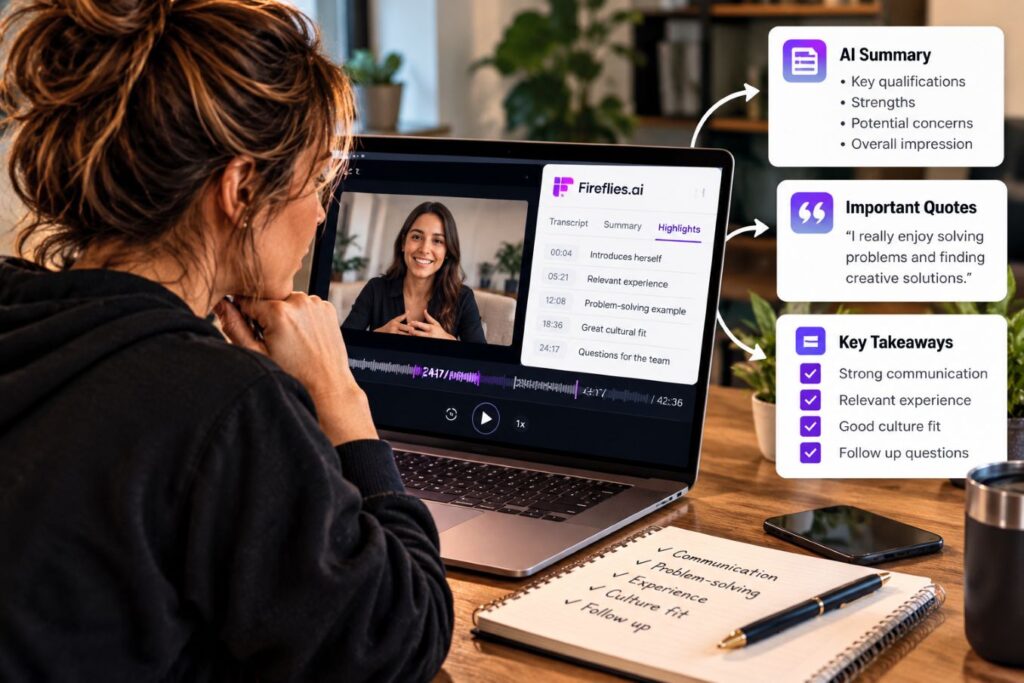
Fireflies.ai can help by recording interviews with permission and creating summaries you can review afterward. Instead of relying on memory or scattered notes, you can revisit each candidate’s answers and compare their experience with what the job actually requires.
Here’s how to make the hiring process more organized:
- Prepare the same core questions for every candidate.
- Explain the recording process and get permission first.
- Use Fireflies to capture and summarize each interview.
- Review answers based on the skills the position requires.
- Compare candidates using the same job-related criteria.
For example, if you’re hiring a customer service representative, you might ask everyone how they’d handle an angry customer. Later, you can review their actual responses instead of trying to remember who gave the best example.
Some Fireflies AI features can also help organize interview information into structured summaries. However, AI shouldn’t decide who gets hired. That’s your responsibility, and every candidate deserves a fair evaluation.
The goal isn’t to automate hiring decisions. It’s to make better-informed decisions using information you can actually review.
Use Fireflies.ai for Entrepreneurs to Make Smarter Growth Decisions
Once you’ve got your daily operations under control, it’s time to look at the bigger picture. Are your customers getting what they need? Are competitors offering something you haven’t considered? And are all those meetings actually helping your business grow?
Sometimes the answers are hiding in conversations you’ve already had. Fortunately, Fireflies.ai can help you spot useful patterns, review customer concerns, and identify areas where your business could improve.
These final three strategies show how to use that information to improve sales conversations, understand market trends, and stop wasting time on meetings that aren’t moving your business forward.
13. Improve Sales Calls by Listening More
Have you ever gotten so excited about explaining your product or service that you barely let the customer speak? It happens, especially when you believe in what you’re selling. However, if you’re doing all the talking, you might miss the very problem your customer needs you to solve.
Fireflies.ai offers conversation analytics that measure how much time each person spends speaking during a recorded meeting. This can help you see whether you’re listening enough or spending most of the call delivering a sales pitch.
For example, imagine reviewing a sales call and discovering you talked for 80% of the conversation. That doesn’t automatically mean you did anything wrong, but it’s worth looking closer. Did the customer have enough time to explain their needs, ask questions, or raise concerns?
After reviewing a call, ask yourself:
- Did I ask questions before offering solutions?
- Did I interrupt or rush the customer?
- Did I clearly explain how my product could help?
- Did I address their concerns?
- Did we agree on what happens next?
Use those answers to make small improvements in future conversations. Additionally, reviewing the transcript can help you catch questions you overlooked or concerns that deserve a follow-up.
And don’t get too caught up in finding the perfect speaking-to-listening ratio. The goal isn’t to win a statistics contest. It’s to understand your customers well enough to offer something they actually need.

14. Track Competitor Mentions and Market Trends
You don’t always need expensive market research to find out what customers want. Sometimes they’ll tell you exactly what other businesses are offering, especially when they’re comparing products or looking for something yours doesn’t provide.
Imagine selling digital planners and hearing several customers mention a competitor’s interactive version. That doesn’t mean you should rush out and copy it. However, it might be worth investigating whether your customers would benefit from a similar feature.
Fireflies.ai can help you spot these patterns by making recorded conversations searchable. Its topic-tracking features can also help you find recurring words and phrases across meetings, depending on your plan.
Here’s what you can look for:
- Competitor names customers mention.
- Features they wish your products included.
- Complaints about pricing or value.
- Alternative products they’re considering.
- New problems or changing customer needs.
Want to try it? Choose three topics related to your business and track how often customers mention them over the next month. Then review those conversations to understand what people actually said and why.
Of course, a few comments don’t prove there’s a market for something. Compare your findings with customer surveys, competitor research, or a small product test before investing serious time or money.
The takeaway? You don’t have to chase every competitor. Pay attention to what customers keep asking for, then decide whether those needs fit your business.
15. Replace Unnecessary Meetings With Clear Updates
Ever sit through a 30-minute meeting that could’ve been handled with a quick email? Everyone takes turns explaining what they’re working on, only to return to the same tasks afterward. Meanwhile, you’ve lost half an hour you’ll never get back.
Some meetings are necessary, but not every project update requires everyone to stop working. Fireflies.ai can help by transcribing recorded updates and creating summaries that team members can review when it’s convenient.
For example, imagine managing a few remote contractors. Instead of scheduling another video call, you could ask each person to record a short progress update. Fireflies can turn those recordings into searchable transcripts, making it easier to catch up without gathering everyone for a meeting.
A useful update should answer three questions:
- What’s finished? Share the work you’ve completed.
- What’s next? Explain what you’re working on now.
- What’s holding you back? Identify problems that need attention.
Of course, complicated decisions, disagreements, and sensitive topics still deserve a real conversation. The goal isn’t to avoid talking to people altogether.
It’s to stop filling your calendar with meetings that don’t accomplish anything, so you can spend more time doing the work that actually moves your business forward.
How to Get Started With Fireflies.ai
After reading about 15 different ways to use Fireflies.ai, you might feel tempted to connect every app and automate your entire business. But hold on. That’s how a tool meant to save time turns into another project that eats up your weekend.
You don’t need to learn everything at once. Instead, start with one problem you want to solve and build from there.
Step 1: Choose Your Biggest Time-Waster
Think about what slows you down during a normal workday. Do you forget important client details, spend too much time writing follow-up emails, or struggle to keep track of commitments?
Pick one problem to focus on first. For beginners, meeting summaries and action items are a good place to start because they’re easy to understand and useful for many businesses.
Step 2: Create Your Account and Review the Settings
Visit the Fireflies.ai pricing page and look at the available plans. There’s a free option, although some features and usage limits depend on your subscription.
Once you’ve created an account, take a few minutes to explore the settings. Pay particular attention to recording permissions, privacy controls, and who can access your meeting information.
Step 3: Test It With One Meeting
Choose a simple meeting where everyone agrees to being recorded. Let Fireflies capture the conversation, then open the transcript and summary afterward.
Did it correctly identify the important points? Are the names, deadlines, and action items accurate?
Don’t worry about using every feature yet. The goal is to understand how the software works and whether it actually saves you time.
Step 4: Build One Simple Routine
Once you’re comfortable with the basics, create a habit you can repeat after every client meeting.
For example:
- Review the meeting summary.
- Correct any important mistakes.
- Add action items to your schedule.
- Send necessary follow-up messages.
- Save the information somewhere easy to find.
That’s it. You’ve now got a simple system for keeping track of conversations without depending entirely on memory.
Later, you can explore additional features, including customer management software connections and project management tools. However, only add them when they solve a problem you’re actually experiencing.
Start small, learn what works, and expand when there’s a good reason.
Is Fireflies.ai Worth It for Small Business Owners?
That depends on how often you meet with clients, conduct interviews, or manage projects. If you’re constantly juggling conversations and follow-ups, Fireflies.ai could save you time and help prevent important details from slipping through the cracks.
However, if you rarely attend meetings, another paid subscription might not make sense. Fortunately, Fireflies offers a free plan, so you can test its basic features before spending money.
The bottom line? Don’t pay for AI just because it’s popular. Use it when it solves a real problem and makes running your business easier.
Final Thoughts: Make Every Conversation Count
Running a business takes more than good ideas. You have to remember commitments, make decisions, and follow through on what you promise. However, when you’re juggling customers, projects, and everyday responsibilities, keeping track of everything isn’t always easy.
That’s where Fireflies.ai for Entrepreneurs can help. Whether you’re managing client calls, improving sales conversations, or turning customer feedback into useful content, the goal is simple: spend less time chasing information and more time putting it to work.
But don’t mistake automation for progress. AI can organize your notes, identify tasks, and help you plan your next move. Discipline is still what gets the job done.
And if you’re serious about building a business that lasts, the right habits matter just as much as the right technology.
Explore the journals, planners, and productivity tools in the Caliber Motivation Co. Shop to help you stay focused, build consistency, and follow through on your goals.
Because success isn’t about how busy you are. It’s about what you actually accomplish.
Join The Standard
Get practical articles on discipline, mindset, structure, and execution delivered straight to your inbox.
No hype. No fluff. Just real-world strategies to help you stay focused and keep building.
No spam. Unsubscribe anytime.