
Running a business means balancing two kinds of work: the work that generates revenue and the administrative work that keeps everything moving. Using Claude for entrepreneurs can help reduce the time spent on that second category.
Emails pile up. Invoices need follow-up. Calendars get crowded. Financial reports need reviewing. Content still has to get created.
Claude can help with much more than basic writing and brainstorming. Built by Anthropic, Claude supports plugins, skills, and connectors that integrate with tools small businesses already use—including Google Workspace, Microsoft 365, QuickBooks, PayPal, Stripe, HubSpot, Canva, DocuSign, and Slack.
That changes how entrepreneurs can use AI in their daily operations.
Instead of only asking Claude a basic question and getting text back, you can use specialized skills for specific business tasks. Claude can retrieve information from connected tools and, depending on the connector and permissions, take actions within them to support multi-step workflows.
Think of it like giving Claude access to a custom operational toolbox:
- Connectors link Claude to your everyday software stack.
- Skills give Claude specific instructions, guidelines, and context for operational tasks.
- Your Approval keeps you in control—allowing you to verify reports, check drafts, or confirm actions before anything is finalized.
You do not need to automate every single process in your business. The goal is simple: identify the administrative friction that steals your time and use Claude to streamline it.
If you are wondering how to use Claude for business, these 15 practical examples show how entrepreneurs can use Claude to reduce repetitive work and streamline daily operations.
Table of Contents
Cash Flow & Financial Management
1. Start Your Week With a Clear Game Plan
Monday mornings can get away from you fast.
You check your email, then your calendar, then messages. Before long, you have spent half an hour figuring out what actually needs your attention first.
With Claude you can connect tools like Gmail, Slack, Google Calendar, and your CRM to Claude. Then Claude can pull that information together into one weekly summary.
That summary can help you see:
- Meetings coming up
- Emails that need a response
- Customers or leads you need to follow up with
- Tasks you may have missed
- Your top priorities for the day
Instead of jumping between several apps, you can start with one clear overview.
That means less time sorting through information and more time working on the things that actually move your business forward.
If staying focused is the bigger challenge, these AI prompts for discipline can help you turn scattered priorities into a clearer daily plan.
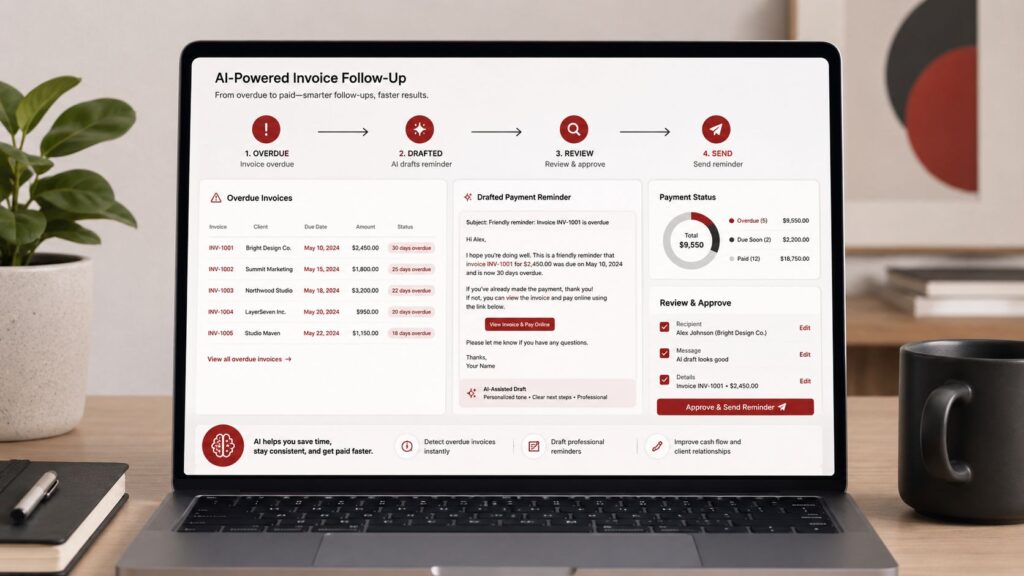
2. Follow Up on Unpaid Invoices
You did the work. Now you need to get paid.
The problem is that unpaid invoices are easy to lose track of when you are juggling customers, emails, and daily work.
You can connect payment tools like Stripe or QuickBooks to Claude. Then Claude can help identify which invoices are still open and organize the information for you.
It can also review past email conversations and draft a follow-up message based on the context.
That can help you quickly see:
- Who still owes you money
- How much is overdue
- Whether you already followed up
- Which customers need another reminder
- What message makes sense to send next
You still review the message before sending it.
However, Claude can take a lot of the tracking and drafting off your plate, so you spend less time chasing payments and more time getting back to work.
3. See Where Your Money Is Going
Money can be coming into your business and still leave you wondering if you actually have enough to cover what is coming next.
Bills may be due before customer payments arrive. You may also have subscriptions, supplies, payroll, or other expenses pulling money back out.
You can connect financial tools like Stripe to Claude. Then Claude can help organize your incoming payments and expected expenses into a clearer cash flow view.
That can help you answer questions like:
- How much money is expected to come in?
- What bills or expenses are coming up?
- Will cash be tight next month?
- Can you afford a large purchase?
- Is this a good time to hire or invest?
Claude can also help build 30-, 60-, and 90-day cash flow estimates and organize them into a spreadsheet.
The goal is not to let Claude make financial decisions for you.
It is to help you understand the numbers faster so you can make better decisions yourself.
4. Make End-of-Month Bookkeeping Easier
Bookkeeping can turn into a mess fast when receipts, payments, and expenses pile up all month.
Then month-end arrives, and you have to sort through everything before you can even tell how the business did.
You can upload financial records or connect accounting tools to Claude. Then Claude can help organize the information and point out items that may need a closer look.
It can help you:
- Sort transactions into clear categories
- Spot missing information or possible discrepancies
- Summarize income and expenses
- Organize records before sending them to your accountant
- Turn confusing financial data into a plain-English summary
Claude should not replace your accountant.
However, it can help you clean up the information first, which can save time and make your end-of-month bookkeeping much easier to manage.

5. See Which Products or Services Make You the Most Money
It is easy to confuse high sales volume with actual profitability.
By feeding Claude project expense data, contractor invoices, and client billing records, you can ask it to calculate estimated profit margins across different service packages or products—helping you spot where costs are creeping uHigh sales do not always mean high profit.
You may have a service that stays busy but barely makes money after labor, materials, fees, and other costs are taken out.
You can give Claude information like project costs, contractor invoices, product expenses, and customer billing. Then Claude can help compare what you spent with what you earned.
It can help you see:
- Which services bring in the best profit
- Which products cost too much to deliver
- Where labor or material costs are getting too high
- Which prices may need to be adjusted
- Which offers may no longer be worth your time
This gives you a clearer picture of what is actually making money.
That way, you can focus more on the work that pays and less on the work that only keeps you busy.p or where pricing needs adjustment.
Sales, Growth & Marketing
6. Turn Marketing Ideas Into Clear Campaign Plans
You may know what you want to promote but still get stuck figuring out how to turn the idea into actual content.
That can mean writing headlines, planning graphics, deciding what to post, and making sure everything matches.
You can connect a tool like Canva to Claude. Then Claude can help organize your campaign idea into a clearer plan.
It can help you:
- Turn a rough idea into a campaign outline
- Draft headline and promotional copy
- Suggest graphics or content pieces you may need
- Organize messaging for different platforms
- Keep the campaign focused on one clear goal
This can save you from staring at a blank Canva screen wondering where to start.
Instead, you begin with a plan you can actually work from.
7. Respond to New Leads Faster
When someone reaches out about your business, waiting too long to respond can cost you the sale.
The problem is that new inquiries often come in while you are already busy doing something else.
You can give Claude the lead details and your basic sales guidelines. Then Claude can help you review the inquiry and draft a response.
That can help you quickly see:
- What the person is asking for
- Whether they may be a good fit
- What information you still need from them
- What questions you should ask next
- How to respond without starting from scratch
You still decide who you want to work with.
However, Claude can help you respond faster and keep good leads from getting buried.
8. Bring Past Customers Back
Not every customer who stops buying from you is gone for good.
Sometimes people simply get busy, forget, or need a reason to come back.
You can give Claude information from past sales, customer lists, or previous promotions. Then Claude can help you look for simple ways to reconnect with former customers.
It can help you:
- Identify customers who have not purchased recently
- Brainstorm reasons to reach back out
- Draft re-engagement emails
- Create simple return-customer offers
- Plan promotions for slower periods
For a service business, that could mean reminding past customers it is time to schedule again.
For an online business, it could mean bringing attention back to a product, offer, or new release.
The goal is to make better use of the customers you already worked hard to earn.

9. Plan Your Content Before You Need It
One of the easiest ways to use Claude for small business is to plan content before you need it.
Trying to think of something to post every day gets old fast.
You sit down to work and realize you still need a blog idea, an email topic, a social post, or all three.
Claude can help you plan those ideas ahead of time.
Give it your main business topics, audience, goals, and previous content. Then ask it to organize those ideas into a content calendar.
It can help you plan:
- Blog topics
- Social media posts
- Email newsletter ideas
- Product promotions
- Seasonal content
- Topics that support your business goals
Instead of deciding what to publish at the last minute, you can sit down with a clear plan already in front of you.
That makes consistency much easier.
If you’re still deciding which AI tool fits your business best, visit our AI for Entrepreneurs hub for a breakdown of Claude, ChatGPT, Perplexity, and other useful platforms.
Operations, Legal & Customer Experience
10. Spot Customer Problems Before They Grow
Small customer problems can turn into bigger ones if you do not notice the pattern early.
You may get several similar complaints, refund requests, or questions without realizing they are all pointing to the same issue.
You can give Claude customer emails, support notes, or feedback. Then Claude can help group the information into common themes.
It can help you see:
- What customers keep asking about
- Where people are getting confused
- Which complaints come up most often
- Whether one product or service creates more problems
- What issues may need your attention first
That gives you a better chance to fix problems before they start costing you customers.
11. Handle Customer Complaints More Clearly
A frustrated customer can be hard to respond to, especially when you are already stressed or busy.
You may know what happened but still struggle to write a calm, professional response.
You can give Claude the customer’s complaint, order details, and any past communication. Then Claude can help draft a response for you to review.
It can help you:
- Summarize what went wrong
- Keep the tone calm and professional
- Explain the next step clearly
- Offer a reasonable solution
- Avoid writing something emotional in the moment
You still decide what to say and what solution to offer.
Claude simply helps you organize the response so you can handle the situation more clearly.
12. Understand Contracts Before You Sign Them
Contracts can be difficult to read when they are packed with legal language.
You may understand the main agreement but miss an automatic renewal, cancellation rule, or fee buried several pages in.
You can upload a contract to Claude and ask it to explain the important terms in plain English.
It can help you find:
- Auto-renewal clauses
- Cancellation deadlines
- Payment terms
- Liability language
- Fees or penalties
- Sections you may want to ask about
That makes it easier to know what you are agreeing to before you sign.
Claude can be useful for a first review, but it does not replace professional legal advice.

13. Make Hiring and Onboarding Easier
Hiring someone means more than finding the right person.
You also need a clear job description, interview questions, expectations, training steps, and a plan for their first few weeks.
Claude can help you organize those pieces before a new employee or contractor starts.
It can help you draft:
- Job descriptions
- Interview questions
- Candidate scorecards
- Offer letter outlines
- First-week checklists
- 30-day onboarding plans
That gives you a repeatable process instead of starting over every time you hire someone.
Always review employment documents with an HR or legal professional when needed.
14. Turn What You Know Into Step-by-Step Instructions
A lot of business knowledge lives in your head.
You know how to complete a task because you have done it hundreds of times, but explaining every step to someone else can take longer than doing it yourself.
You can give Claude rough notes, voice-note summaries, meeting transcripts, or a simple list of steps. Then ask it to turn that information into a clear Standard Operating Procedure, or SOP.
It can help organize:
- The purpose of the task
- Tools or supplies needed
- Steps in the correct order
- Common mistakes to avoid
- Quality checks
- What to do when something goes wrong
That makes training and delegation much easier.
Instead of explaining the same task over and over, you have written instructions someone can follow.
15. Make Long Research Easier to Understand
Research can eat up hours when you are trying to understand a new market, competitor, or business opportunity.
You may have reports, surveys, articles, and other documents open at the same time and still struggle to see what matters.
You can upload those materials to Claude and ask it to summarize the most useful information.
It can help you pull out:
- Major industry trends
- Pricing changes
- Common customer concerns
- New opportunities
- Important statistics
- Differences between competitors
- Questions that still need more research
Instead of reading every document from beginning to end, you can start with a clearer overview.
That helps you spend more time making decisions and less time sorting through information.
How to Get Started
If you want to start streamlining daily tasks with Claude, you do not need to overhaul your entire business at once:
- Identify One Time-Consuming Task: Choose a single administrative bottleneck in your week—such as drafting Monday plans, reviewing unpaid invoices, or summarizing customer notes.
- Set Up Connectors & Permissions: Link Claude to your core tools (such as Google Workspace, Stripe, or your CRM) and configure your permissions so you retain final approval on actions.
- Establish Clear Rules: Give Claude explicit instructions, brand guidelines, and formatting rules so its outputs more consistently match your business standards.
For more practical ideas, read 15 Smart Ways to Use ChatGPT for Entrepreneurs or 15 Smart Ways to Use Perplexity for Entrepreneurs.
Disclosure: This post may contain affiliate links. If you purchase through these links, Caliber Motivation Co. may earn a small commission at no extra cost to you.
Recommended Reading: Go Deeper With Claude
1. Claude AI for Absolute Beginners — Nolan R. Vance
This is the best place to start if Claude still feels unfamiliar. It explains the basics in plain language and focuses on practical ways to use Claude for writing, research, organization, and everyday work without burying you in technical jargon.
2. A Hands-On Claude AI Build Guide: From Student to Entrepreneur — Bilal Qureshi
This one goes deeper into using Claude for business. It covers AI-powered workflows, content systems, market research, sales outreach, automation, and building repeatable systems for entrepreneurs, freelancers, and creators.
3. Claude AI for Non-Coders — Daley Lawson
This is a good fit for readers who want practical ways to use Claude without getting pulled into coding or technical complexity. It focuses on real use cases, reusable prompts, and simple workflows that can help you save time and get more useful results faster.
You do not need to read all three. Start with the one that fits your current level, then go deeper as you begin using Claude for more of your daily work.
For an even more current look at how founders are using Claude, Anthropic also publishes practical guides for startups and small businesses that cover workflows, Cowork, Claude Code, and AI-native operations.
Final Thoughts
As you learn how to use Claude, start with one task that already takes too much of your time.
Claude will not run your business for you. However, it can remove a surprising amount of the repetitive work that keeps you from doing higher-value work.
Start with one problem. Build one useful workflow. Then expand only when it saves you measurable time.
Better systems create more room for better decisions.
Ready to build stronger systems in your business and life? Visit the Caliber Motivation Co. shop for practical tools built to help you stay disciplined, organized, and consistent when the work gets hard.
Join The Standard
Get practical articles on discipline, mindset, structure, and execution delivered straight to your inbox.
No hype. No fluff. Just real-world strategies to help you stay focused and keep building.
No spam. Unsubscribe anytime.