
Does your business feel scattered across notes, tabs, spreadsheets, and half-finished ideas? Are you constantly trying to remember where you put something or what needs your attention next? Discover how Notion for entrepreneurs can help you organize projects, content, products, deadlines, and business systems in one place.
The truth is, sometimes the work itself isn’t the problem. It’s keeping track of everything.
You write something down, forget where you put it, open six tabs, make another note on your phone, and still feel like something important is slipping through the cracks.
That’s where Notion can help.
Instead of keeping pieces of your business in five different places, Notion gives you one home for projects, tasks, content, goals, notes, products, and business systems. Additionally, you can view that information as tables, calendars, lists, boards, charts, or dashboards.
However, don’t make the mistake of turning Notion into another project you have to manage. You don’t need a beautiful dashboard with twenty widgets.
You need a system you’ll actually open and use.
If you spend more time organizing your productivity system than doing the work, the system has missed the point.
- How to Use Notion for Entrepreneurs
- Planning and Productivity With Notion for Entrepreneurs
- Content and Marketing With Notion for Entrepreneurs
- Sales, Products, and Business Growth
- Operations and Systems With Notion for Entrepreneurs
- Factors That Can Make Notion Slow You Down
- How to Get Started With Notion for Entrepreneurs
- Frequently Asked Questions About Notion for Entrepreneurs
- Final Thoughts on Notion for Entrepreneurs
- Over To You
How to Use Notion for Entrepreneurs
If you’re new to Notion, don’t try to build some giant business command center on your first day. Start with the stuff you’re already losing track of, whether that’s your blog schedule, product ideas, customer follow-ups, or a task list buried in your phone.
Notion works in blocks, which simply means every piece of a page can be moved, changed, or rearranged. You can add text, checklists, tables, calendars, images, and databases without needing to know anything technical.
You can also type / on a blank line to quickly add whatever you need. That makes the setup much less intimidating when you’re just getting started.
For your business, I’d start with one simple home page that links to the areas you use most. For example:
- A master task list
- A content calendar
- A product pipeline
- A business dashboard
- A lead tracker
- A weekly planning system
From there, build only what makes your day easier. For example, if your content calendar is working fine, leave it alone. However, if you keep forgetting follow-ups, add a lead tracker next.
Templates can also save you time when you’re starting out. Instead of building everything from scratch, you can take a basic setup and adjust it to fit the way you work.
The point isn’t to build a fancy Notion setup. Instead, it’s to stop wasting time hunting for things and make it easier to see what you need to do next.
Planning and Productivity With Notion for Entrepreneurs
1. Build a Master Business Dashboard
Your business dashboard should show you what matters right now. If you have to click through five different pages just to figure out what needs your attention, the system is already making your day harder.
Instead, build one central dashboard that points to the parts of your business you use most. Think of it as the page you open first when you sit down to work.
Your dashboard might include:
- Today’s priorities
- Active projects
- Upcoming deadlines
- Content schedule
- Product launches
- Weekly goals
- Revenue targets
- Important links
Additionally, Notion can combine tables, boards, calendars, timelines, and charts in one place. That means you don’t have to keep bouncing between separate pages just to get a clear picture of what’s going on.
However, don’t cram everything onto the dashboard just because you can. Keep it focused on the information you actually need to make decisions.
When you open it, you should be able to tell within a few seconds what needs your attention next.
If you’re comparing tools for different parts of your business, you can also see my guide to the 10 Best AI Platforms for Entrepreneurs for a broader look at the tools that can help with planning, research, content, and daily operations.

2. Create One Master Task System
If your to-dos are spread across sticky notes, your phone, email, and random tabs, it gets hard to know what actually needs your attention next.
In Notion, you can create one master task database and keep everything in one place. Each task can include the due date, priority, project, status, business area, and estimated time.
From there, you can create different views depending on what you need to see. For example, you might have Today, This Week, Overdue, and High Priority so you’re not staring at your entire workload every time you open Notion.
Additionally, Notion lets the same task appear in different filtered views without you entering it more than once. That keeps everything connected without creating duplicate lists everywhere.
What I like about this is that you can open one page and quickly see what actually needs to get done. You’re not digging through notes, tabs, or old emails trying to remember where you wrote something down.
Most importantly, keep the system simple enough that you’ll actually use it. If updating your task manager starts feeling like another job, you’ve probably made it too complicated.
3. Plan Your Week Before It Starts
A long list of things you need to get done doesn’t necessarily tell you which things are most important. When everything is sitting in one giant list, it’s easy to spend time on smaller jobs while the bigger ones keep getting pushed back.
In Notion, you can create a simple weekly planning page and use it to narrow things down. Just pick your top three priorities, add any hard deadlines, and pull in the things that really need to happen that week.
For example, maybe you have a blog post that needs to go live Monday, a product listing to finish by Wednesday, and two customer follow-ups you can’t forget. That gives you a much clearer picture than staring at twenty unrelated things on one list.
Additionally, you can add a filtered view of your master task database so it only shows what’s due that week. That way, you’re not digging through your entire workload every time you sit down.
At the end of the week, take a few minutes to look back at what got done and what didn’t. If something keeps getting pushed off, it may not be as important as you thought, or you may need to make more room for it next week.
The goal is to make your week easier to see and easier to manage. Notion should help you decide what deserves your attention, not just give you another place to store things.
Content and Marketing With Notion for Entrepreneurs
4. Build a Complete Content Calendar
If content brings people to your business, a random list of ideas usually won’t be enough for long. You need somewhere you can see what you’re working on, what’s scheduled, and what still needs attention.
In Notion, you can create one content database and track each piece from the first idea all the way through publication and promotion.
You could track:
- Content title
- Category
- Focus keyword
- Status
- Publish date
- Internal links
- Images
- Promotion status
- Pinterest pins
- Updates needed
What I love about this is that you can see the whole content process in one place instead of trying to remember what still needs an image, SEO work, internal links, or promotion.
From there, you can switch to a calendar view to see what’s coming up. For example, you can quickly spot a week that’s overloaded or notice a gap where nothing is scheduled.
Additionally, you can update dates right from the calendar instead of opening every individual entry. That makes it much easier to adjust your schedule when life or business gets in the way.
The whole point is to make your content easier to manage, not give yourself another complicated system to babysit.
Want to see exactly how this works? Watch Alex Cunningham’s video, How to Build a Content Calendar in Notion (Working 2026), for a quick step-by-step walk-through of setting up and customizing a Notion content calendar.
Prefer putting pen to paper? If you’d rather track your content on printed pages instead of inside another app, my Content Output Tracker gives you a simple place to plan what you’re creating, what still needs work, and what’s ready to publish.
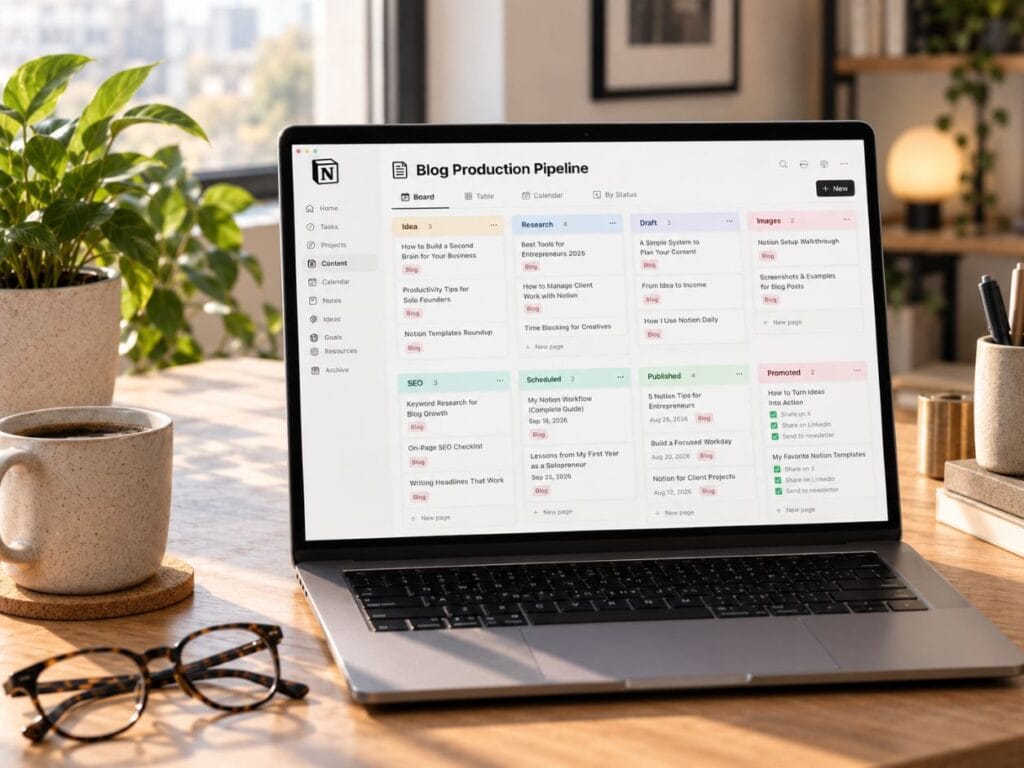
5. Create a Blog Production Pipeline
A blog idea is only the beginning. Before that post is finished, you still have research, writing, images, SEO, links, editing, scheduling, and promotion ahead of you.
In Notion, you can turn that whole process into a simple visual pipeline. One article might start under Idea, move to Research, then Draft, Images, SEO, Scheduled, Published, and finally Promoted.
What I like about this setup is that you can open the board and immediately see where every article stands. If three posts are sitting in the image stage, you know exactly what needs attention next.
You can also create a reusable blog template for every new article. A simple setup could include the focus keyword, SEO title, meta description, internal and external links, image filenames, alt text, Pinterest ideas, and a final publishing checklist.
Additionally, using the same template each time means you’re less likely to forget one of those small steps when you’re trying to get a post finished. Once you have a process that works, you can reuse it instead of rebuilding everything from scratch.
The goal is to make the publishing process easier to follow. That way, you can spend less time trying to remember what comes next and more time actually finishing the article.
6. Create A Content Promotion Tracker
Sometimes life gets busy, and content promotion is one of the first things that slips through the cracks. You publish something, move on to the next job, and a few days later you can’t remember where you shared it or whether you meant to come back to it.
I’ve had this happen myself. I published a blog, but it wasn’t time to promote that category yet, so I moved on to something else and completely forgot to go back and promote the post later.
That’s why creating a promotion tracker in Notion can make such a difference. You can keep one place for what you’ve already shared, what still needs attention, and what you want to promote again later.
What I like about this is that it takes some of the pressure off your brain. You don’t have to keep asking yourself, “Did I already promote this?” or endlessly scroll through an Excel sheet trying to remember which blog you pinned last.
Instead, you can keep track of where you promoted something, when you shared it, which graphic or headline you used, and whether it needs another round of promotion.
For example, maybe you published a blog post on Monday, created two Pinterest pins for it, mentioned it in an email, and want to bring it back around next month. Notion gives you one place to see all of that instead of relying on your memory.
Additionally, you can connect the promotion back to the original article or product. That makes it much easier to spot content you worked hard on but never gave enough promotion.
The goal isn’t to give yourself another complicated tracker to maintain. It’s to make sure the work you already finished doesn’t get forgotten.
7. Create an Idea Bank
I don’t know if you’re like me, but I get a million ideas running through my head all the time. A blog topic, product idea, headline, or design concept will pop into my head, and I immediately start trying to save it somewhere before I forget it.
I’ve emailed ideas to myself, started AI chat threads, written notes in my phone, and saved things in random places. The problem comes later when you remember the idea but have no clue where you put it.
That happened to me with a bunch of T-shirt designs I wanted to create. I was sure I had emailed the ideas to myself, so I wasted a ton of time digging through old emails and bouncing back through AI chat threads trying to find them.
I never did.
That’s why creating an idea bank in Notion can be so useful. Instead of scattering ideas everywhere, you can give yourself one place to drop them as soon as they come to you.
You can save blog ideas, product concepts, headlines, quotes, research, marketing angles, customer questions, or anything else you may want to revisit later. Additionally, you can add simple tags so related ideas are easier to find.
For example, a T-shirt idea could be tagged Apparel, Discipline, and Future Product. Then, when you’re ready to work on shirts again, you can pull up those ideas without searching through six different places.
The point is simple: your ideas need a home. Otherwise, you can waste more time looking for a good idea than it would’ve taken to start working on it.
Sales, Products, and Business Growth
Disclosure: This post may contain affiliate links. If you purchase through these links, Caliber Motivation Co. may earn a small commission at no extra cost to you.
Want to go a little deeper with Notion? If you prefer learning from a book, these guides can help you understand the platform and build better systems for your business.
| Book | Best For | What You’ll Learn |
|---|---|---|
| Notion Templates for Small Business by T.S. Avini | Entrepreneurs who want ready-made systems | Focuses on dashboards, workflows, and planning systems for solopreneurs and service providers. |
| Notion for Small Business by T.S. Avini | Entrepreneurs who want a business operating system | Covers tasks, clients, content, and ideas, so it lines up closely with what this article is teaching. |
| The Everyday Notion AI for Beginners and Seniors — Alia Parker | Beginners who want to learn Notion AI | Shows beginners how to use Notion AI to organize information, manage tasks, save ideas, and feel more confident using the platform. |
8. Manage Your Product Development Pipeline
Product ideas have a way of piling up. You think of something you want to create, jot it down somewhere, start working on it, and then another idea comes along before the first one is finished.
That’s where a product development pipeline in Notion can help. Instead of trying to remember what stage every product is in, you can see the whole process in one place.
A simple setup might move each product through stages like Idea → Research → Design → Production → Listing → Marketing → Live. As the product moves forward, you simply move it to the next stage.
What I like about this is that you can tell at a glance what still needs work. Maybe one product is waiting on images, another still needs pricing, and another is ready to list but hasn’t been promoted yet.
You can also keep the important details attached to each product, such as the cost, selling price, supplier, launch date, files, description, and marketing assets. Additionally, each product can open into its own page, giving you room for notes, links, images, and anything else you need to keep with it.
That’s especially useful when you have several products in progress at the same time. Instead of letting half-finished ideas pile up, you can open the pipeline and see exactly what needs your attention next.
9. Build A Simple Customer Relationship Management System
A Customer Relationship Management system, or CRM, is simply a way to keep track of customers, leads, conversations, and follow-ups in one place.
That’s why Notion can work so well for this. You can build a simple system without dealing with complicated software or a bunch of features you may never use.
For example, you can keep someone’s name, company, email, how they found you, the last time you talked, what they were interested in, and whether you need to follow up.
What I like about this is that you don’t have to rely on your memory every time someone comes back around. Instead, you can open their page and quickly see where you left off.
Additionally, you can create different views for new leads, follow-ups, and current customers. That makes it easier to see who may be waiting on a response instead of letting someone slip through the cracks.
However, I wouldn’t use Notion to store highly sensitive information. Keep passwords, payment details, and private financial information in tools built specifically to protect that kind of data.
10. Track Your Affiliate Links And Partnerships
Once you start using affiliate links in blog posts, emails, or resource pages, they can get hard to keep track of fast. You may remember promoting a product but forget which article contains the link, which network it came from, or whether you ever updated it.
In Notion, you can create one place to keep all of that information together. You might track the company or product, affiliate program, link, commission rate, where you used it, and when you last checked it.
What I like about this is that you don’t have to dig through old blog posts trying to remember where a certain affiliate link lives. If a company changes its program or you need to replace a link, you can quickly see which pages may need attention.
You can also keep notes about things like payout terms, products you still want to mention, or content ideas related to that affiliate. Additionally, you could create a view that shows affiliate links you haven’t checked in several months.
For example, if you recommend the same book in three different articles, you can connect all three posts to that book inside your tracker. Then, if the link ever changes, you already know exactly where to go fix it.
The point is to keep your affiliate income organized before you have dozens of links scattered across your site.
Operations and Systems With Notion for Entrepreneurs
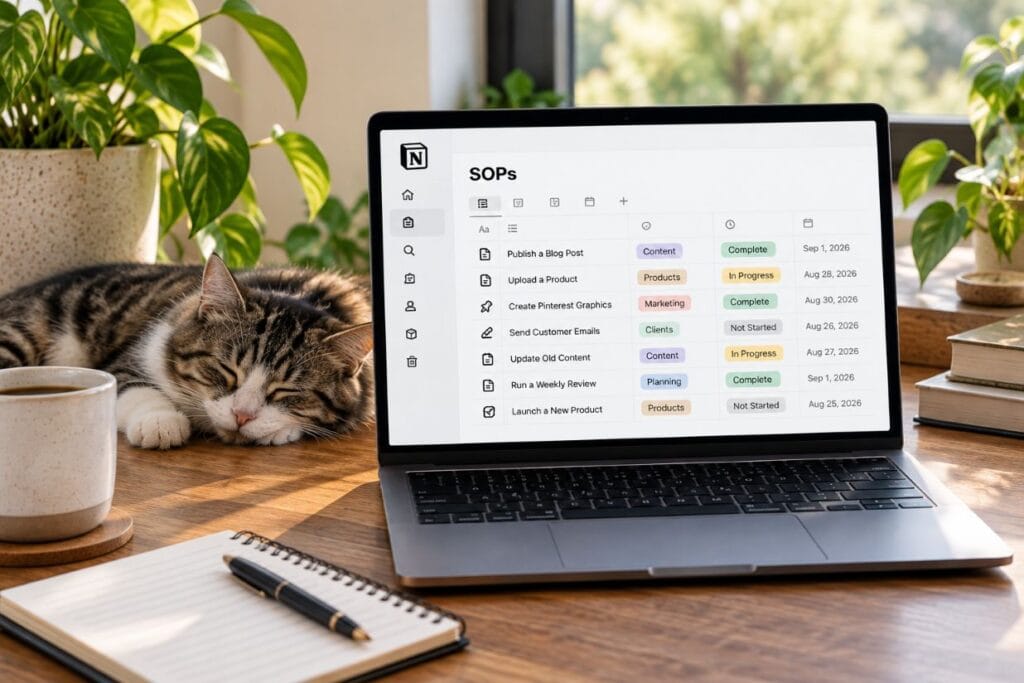
11. Build Standard Operating Procedures
If you do something more than once in your business, it’s worth writing down how you do it. That way, you’re not trying to remember every little step from scratch each time.
In Notion, you can create simple standard operating procedures, or SOPs, for the things you repeat often. That could be publishing a blog post, uploading a product, creating Pinterest graphics, sending customer emails, updating old content, or launching something new.
For example, if one of your SOPs is publishing a blog post, your checklist could remind you to add the excerpt, SEO title, meta description, category, tags, internal links, external links, and images before you hit publish.
What I like about this is that you don’t have to keep all of those little steps in your head. Instead, you can pull up the checklist, follow the same process each time, and feel a lot more confident that you didn’t forget something important.
Additionally, you can turn those SOPs into reusable templates. Once you’ve figured out a process that works, you don’t have to rebuild it every time.
That becomes even more useful as your business grows. You have a clear system you can follow yourself now and hand off later if someone else ever needs to help.
The goal isn’t to document every tiny thing you do. It’s to document the repeatable work that’s easy to forget, easy to mess up, or takes too much mental energy to remember every time.
12. Automate Repetitive Business Tasks
Some business tasks are easy to forget because they don’t come up every day. Website maintenance is a perfect example.
In Notion, you can create reminders for things like backing up your website, checking plugins, reviewing broken links, or making sure important pages still work the way they should.
For example, you could set a reminder to check your plugins at the beginning of each month and another to back up your website every week. When the date comes around, Notion can notify you in the app, on your phone, or by email if you’re not actively using Notion.
Additionally, you could schedule a quarterly reminder to review old pages for outdated links, old information, or images that need to be replaced.
What I like about this is that you don’t have to keep all of those maintenance jobs in your head. They can sit in the background until it’s actually time to deal with them.
That’s especially helpful because these are the kinds of things that are easy to push off when you’re busy with customers, products, or content.
However, I’d keep the system simple. The goal is to make important maintenance harder to forget, not create another giant list you have to manage.
13. Collect Information With Notion Forms
If you’ve ever had people send information through emails, DMs, contact forms, and random messages, you know how easy it is for something important to get buried.
With Notion Forms, you can create a simple form that sends every response straight into a Notion database. That gives you one place to collect information instead of chasing it across different apps.
For example, you could use a form for customer feedback, client intake, testimonials, product ideas, applications, surveys, or lead information. You can choose the questions you want people to answer and then keep every response organized in the same database.
What I like about this is that you don’t have to copy information over by hand. As people submit the form, their responses are already stored where you can sort, filter, or review them later.
Additionally, you could use a form to ask customers what they want more of. If several people keep asking for the same product, topic, or resource, that can give you a pretty clear idea of what to create next.
The goal is to make collecting information easier for both you and the person filling out the form. Instead of creating another pile of messages to sort through later, you have one organized place to come back to.

14. Build a Business Numbers Dashboard
You don’t need to track every number your business produces. You just need the numbers that help you see what’s working, what isn’t, and where you may need to make a change.
In Notion, you can build a simple dashboard that keeps your most important numbers in one place. That could include website traffic, email subscribers, revenue, expenses, orders, conversion rate, published content, leads, or product launches.
What I like about this is that it gives you a quick snapshot without making you dig through five different apps. Instead of checking one place for traffic, another for sales, and another for email growth, you can keep the numbers you care about together.
For example, if your website traffic is going up but sales are flat, that tells you something. Maybe people are finding you, but they’re not taking the next step.
Additionally, Notion can turn database information into charts, which can make trends easier to spot. You can also place different charts on the same dashboard so you can compare the parts of your business that matter most.
The point isn’t to collect numbers just because you can. It’s to make those numbers useful enough to help you decide what to do next.
15. Use Notion AI to Build Systems Faster
Notion gets more and more useful when you start using its AI tools. Instead of building every database, view, and structure from scratch, you can describe what you want and let Notion help set up the starting point.
For example, you could ask it to create a content management database with a title, focus keyword, publish date, status, category, and promotion status. Then you can review what it builds and adjust anything that doesn’t fit the way you work.
That’s what makes this useful for entrepreneurs who already have too much on their plate. You don’t have to spend an hour figuring out how to structure something before you can even start using it.
You can also use Notion AI to summarize notes, organize information, draft outlines, pull action items from text, help with formulas, and create database structures. Additionally, it can save time when you have a rough idea of what you need but don’t want to build every piece manually.
What I like about this is that AI can help you get past the blank-page stage faster. You still decide what belongs in the system and how your business should run.
However, I wouldn’t let AI over complicate something that was already simple. Use it to speed up the setup, then keep only the parts that actually make your work easier.
Factors That Can Make Notion Slow You Down
Here’s the trap.
Notion can save you a lot of time, but it can also become another thing to manage if you’re not careful.
It’s easy to spend an hour changing layouts, moving pages around, or trying to make everything look perfect. That can feel productive, even when the real work still isn’t getting done.
I’ve learned that the system only helps if you actually use it. A simple dashboard you open every day is more useful than a beautiful setup you spend more time fixing than working from.
So keep it practical. Build what you need, leave the rest alone, and don’t let organizing your business become a substitute for running it.

How to Get Started With Notion for Entrepreneurs
Don’t try to build all 15 systems this week. Start with the part of your business that’s causing you the most frustration right now.
If your work feels scattered, start with a dashboard. If deadlines keep slipping, build a task database. And if your content feels chaotic, start with a content calendar.
From there, keep it simple. Choose one problem, build one page or database to solve it, and only add the information you actually need.
Use that system for a week before changing anything. Then remove what you’re not using, improve what’s helping, and add automation later if it actually saves you time.
Notion also gives you templates and AI-assisted setup if you don’t want to start from scratch. However, the goal isn’t to build the perfect workspace.
The goal is to build something you’ll still be using three months from now.
Frequently Asked Questions About Notion for Entrepreneurs
Is Notion Free For Entrepreneurs?
Yes. Notion offers a free plan that gives you plenty to work with when you’re getting started.
However, some advanced features, including certain automations and AI tools, may require a paid plan. It’s worth starting free and upgrading only when you actually need the extra features.
Can I Use Notion To Run A Small Business?
You can run a large part of a small business inside Notion, including projects, content, products, customer information, SOPs, and planning.
That said, I wouldn’t try to force everything into it. Accounting, payments, passwords, and other sensitive information are usually better handled by tools built specifically for those jobs.
What Should An Entrepreneur Build First In Notion?
Start with whatever is causing you the most frustration right now.
If you’re constantly losing track of what needs to get done, start with a master task system. If your business feels scattered across too many places, a simple dashboard may make more sense.
You don’t need to build everything at once. One useful system you actually use is a much better starting point than ten half-finished ones.
Is Notion Good For Entrepreneurs?
Yes. Notion can help entrepreneurs organize projects, content, products, customer information, and business systems in one place.
However, you don’t need to use every feature. Start with one system that solves a real problem and build from there.
Final Thoughts on Notion for Entrepreneurs
Notion won’t do the work for you. It won’t publish the article, launch the product, follow up with the customer, or make the decision you’ve been putting off.
What it can do is remove some of the friction between knowing what needs to happen and actually doing it. When your projects, ideas, deadlines, and systems have a place to live, you spend less time searching and more time moving.
Good systems also take some of the pressure off your memory. You don’t have to keep every deadline, follow-up, product idea, or unfinished task floating around in your head.
However, keep it simple. Build what you need now, use it long enough to see whether it actually helps, and only add more when the extra complexity earns its place.
And if you prefer having some of your planning systems on paper, visit the Caliber Motivation Co. shop for planners, trackers, and practical tools built to help you stay organized and follow through.
Build the system. Then do the work.
Over To You
Are you already using Notion for your business? What part of your business are you trying to organize first?
If you’ve already built a system that works well for you, I’d love to hear what you use it for. And if you still have questions about Notion for entrepreneurs, drop them in the comments below.